20 minutes have passed and the crypto still hasn’t arrived. Where is it right now?
🔎 A transfer is in one of three states: it hasn’t entered the network yet, it’s in the network waiting for confirmation, or it’s already recorded on the blockchain but the recipient hasn’t credited it. The state is determined by the transaction hash (TXID) — a unique identifier for the transfer, similar to a package tracking number.
When withdrawing from an exchange, first check whether the request has a TXID. No hash — the request is still being processed internally by the exchange. Hash present — everything else depends on the blockchain.
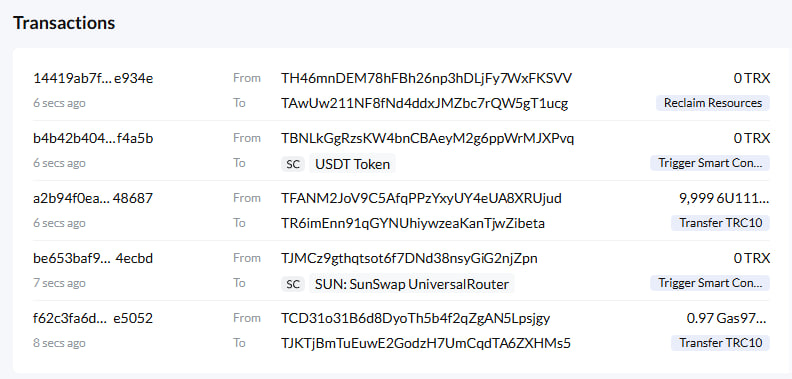
📋 The hash is copied from the transaction history and pasted into a block explorer — a website that displays all the network’s records. If the sender doesn’t provide the hash, the recipient’s address is pasted into the explorer instead. All transactions linked to that address will be visible there.
⚠️ A confirmed transaction cannot be reversed. Tonkeeper, for example, explicitly warns that as a non-custodial wallet it cannot cancel or modify a transfer that has already been sent. So the goal isn’t to get the money back — it’s to figure out exactly where it currently is.
Which Explorer Should You Open for BTC, ETH, USDT, and TON?
The explorer is chosen based on the transfer’s network: network first, hash second. Each network is a separate ledger with its own explorer, and a hash from one network won’t be found in another network’s explorer 🙃. This is the first reason behind false “the transaction doesn’t exist” panic.
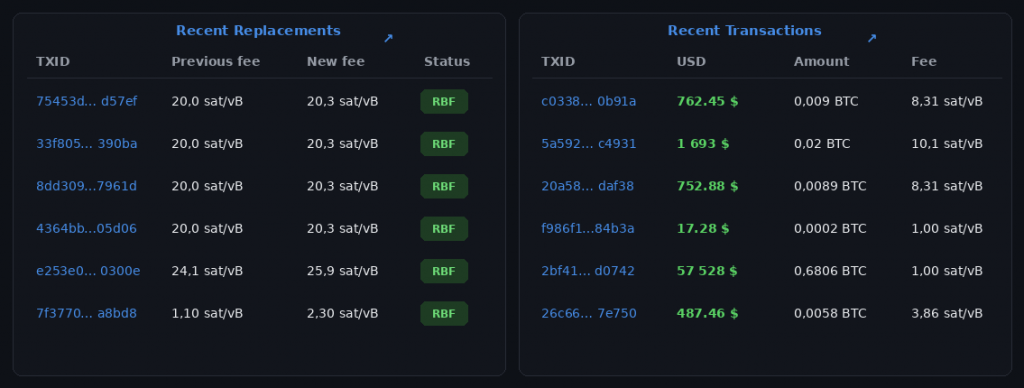
For Ethereum, use Etherscan; for Bitcoin, use Blockchain.com. mempool.space is also popular for Bitcoin. It shows the mempool — the queue of unconfirmed transactions — along with current fee rates.
👀 USDT doesn’t have a single explorer — it all depends on the transfer network:
▪️ TRC-20 is checked on Tronscan
▪️ ERC-20 — on Etherscan
▪️ BEP-20 — on BscScan
▪️ USDT on the TON network — on Tonviewer or Tonscan
The exchange or wallet lists the network in the withdrawal history next to the amount.
The network also hints at the hash format. On Ethereum and BSC, the hash starts with “0x“. On Bitcoin, TRON, and TON, it’s 64 characters with no prefix. If a hash starts with “0x”, there’s no point looking for it on Tronscan.
✅ On TON, the same wallet can be displayed with an address starting with either EQ… or UQ…. These are two formats for writing the same address and don’t affect the transfer. Beginners often mistake a format change for a swapped address.
USDT on TON is a jetton — a token issued under the TON network’s standard. Because of this, Tonviewer displays its transfer not as a single line, but as a chain of several messages. What matters is the final steps of the chain: whether the token actually reached the recipient’s wallet, and whether there are any errors.
How Do You Read the Status: Pending, Success, Failed, or “Not Found”?
A search by hash produces one of four outcomes, and each one points to a different location of the delay.
👉 “Not found” looks the most alarming, but it’s actually the rarest. If the explorer can’t find the hash, the transaction never made it into the network. Most often, the wallet failed to broadcast it to network nodes due to a connection issue, while the transaction itself is fine. The second cause is simply searching in the wrong explorer.
👉 Pending means the transaction has been sent and is sitting in the queue for inclusion in a block. On a congested Ethereum network, inclusion can take 5–15 minutes, so the first 10 minutes of waiting are normal. If more than 10–15 minutes have passed, the sender most likely set too low a fee.
👉 Success or Confirmed is shown along with a number of confirmations. A confirmation is a new block added on top of the block containing the transaction. Most exchanges credit funds only after a certain number of confirmations.
👉 Failed means the transaction was recorded on the blockchain, but the transfer itself didn’t go through. On TRON, this is most often an OUT_OF_ENERGY error: the sender didn’t have enough Energy, the network resource needed to execute a smart contract. Spent Bandwidth, Energy, or TRX usually aren’t refunded, and the USDT itself stays with the sender.
☝️ A Success status confirms the funds reached the address — it does not confirm they were credited to an account. So after seeing that status, double-check the recipient’s address, the network, the amount, and the memo — a comment the exchange uses to identify whose transfer it is.
Why Does the Blockchain Say “Confirmed” While the Exchange Hasn’t Credited the Funds Yet?
❗️ An exchange credits a transfer not when it’s included in a block, but once it reaches the exchange’s own confirmation threshold.
Each platform sets this threshold itself:
▪️ For USDT TRC-20, Binance, OKX, KuCoin, and Bybit require 1 confirmation — about 3 seconds
▪️ Coinbase waits for 19 blocks — around a minute
▪️ The wallet in Telegram processes ERC-20 after 12 confirmations, and TRC-20 after 20
That’s why the same transfer gets credited on different services in very different timeframes.
🐢 Bitcoin is the slowest of the four networks: a new block appears on average once every 10 minutes. For BTC, platforms typically require 1–3 confirmations, most often 2. So a 20–40 minute wait for a BTC deposit is normal, not a malfunction.
⚡ On Ethereum, a block appears every 12 seconds. Finality — the point after which a block can no longer be changed — arrives after roughly 64 blocks. That’s two epochs, the network’s settlement periods, totaling about 13 minutes. On TON, a block appears roughly every 5 seconds, and finality arrives in under 6 seconds.
❤️ On Amana Exchange, crypto purchased with fiat — regular money like som or rubles — is credited to the account instantly.
What Should You Do if a Transfer Is Stuck Due to a Low Fee?
The approach depends on the network: on Bitcoin and Ethereum, a stuck transfer can be sped up or waited out; on TRON and TON, there’s almost never a queue in the first place.
A stuck BTC transaction isn’t lost. The transaction either eventually confirms, or after roughly 14 days (336 hours), nodes remove it from the mempool and the funds return to the wallet as if the transfer never happened.
🙌 BTC can be sped up in two ways:
▪️ RBF (Replace-By-Fee) — resending the same transaction with a higher fee. RBF needs to be enabled in the wallet before sending.
▪️ CPFP (Child Pays for Parent) — the recipient spends the still-unconfirmed coins with a high fee, and miners include both transactions in a block together.
😕 Most mobile wallets don’t offer this level of control. In that case, the only options are to wait or ask the sender to do an RBF.
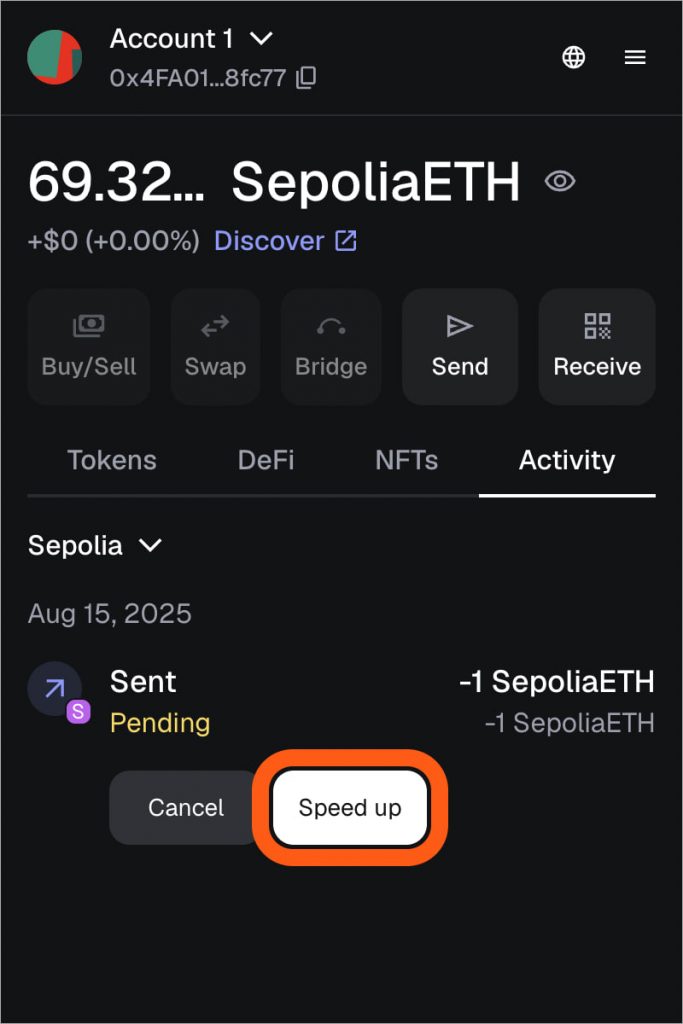
On Ethereum, MetaMask and similar wallets offer “Speed up” and “Cancel” buttons. Both replace the original transaction with a new one using the same nonce — the wallet’s transaction sequence number. Both operations cost gas, the Ethereum network’s fee. Gas spent on the original transaction is not refunded.
On TRON, there’s no queue. A sent transfer either confirms in the next block, in about 3 seconds, or doesn’t go through at all. The main cause is a shortage of TRX. A typical USDT transfer costs roughly 64,285–130,285 Energy — more if the recipient’s address has never held USDT before. The network provides 600 Bandwidth per day for free — the resource used for transmitting transaction data — but does not provide Energy for free.
On TON, the USDT fee is also paid in the network’s native coin. Before sending USDT, keep a small amount of TON in your balance: the average fee is around 0.0145 TON.
The Blockchain Shows Everything Confirmed, But There’s No Money. What Should You Check?
If the blockchain shows Success, the delay is on the recipient’s side, and it’s resolved by the platform’s support team, not the network. There are usually four causes:
▪️ First — wrong network. If the transfer went to an address on a different network, funds, according to Eco, are sometimes recoverable through the receiving exchange within 3–30 days, and sometimes never recoverable at all. That’s why the network needs to be double-checked before sending.
▪️ Second — missing memo on TON. Exchanges accept deposits from many clients into a single shared address and tell them apart by memo. Without it, the exchange can’t link the transfer to an account, and only the receiving platform’s support can help.
▪️ Third — amount below the minimum. A deposit smaller than the minimum is treated as dust — too small an amount — and isn’t credited to the account. The minimum is listed on the deposit page.
▪️ Fourth — AML check (anti-money laundering) — verification of the funds’ origin. The money arrived, but the platform held it for review. In this case, submit a support ticket with the TXID and an explanation of where the funds came from; review takes 1–14 days. Deposit pauses for maintenance fall into this same category.
What Should You Send to Support to Get the Issue Resolved Faster?
In your request, include:
▪️ The TXID, a link to the transaction on the explorer, and the transfer network
▪️ For an exchange withdrawal — the request ID, time, asset, address, and status
🙅 Don’t submit a repeat withdrawal request, and don’t open multiple tickets for the same issue.
🚨 No support team will ever ask for your seed phrase — the set of words used to recover a wallet. Anyone who asks for it is a scammer.